Can Biome Replace ESLint and Prettier?
In this post, I want to talk about a tool called Biome.
The team I work on had considerable difficulty maintaining a consistent code style in an environment where people used different IDEs, including WebStorm and VSCode. Managing separate configuration files for each IDE was cumbersome, and code reviews often filled up with comments about formatting differences unrelated to the actual logic.
When ESLint's formatting-related rules were deprecated, we needed to find a new alternative. The Prettier + ESLint combination required additional configuration to prevent conflicts between the tools, while @stylistic/eslint-plugin-ts was still in the early stages of community adoption and had not yet been proven stable. That was when Biome caught our attention.
So what exactly is Biome, and can it really replace ESLint and Prettier?
What Is Biome?
Biome is an all-in-one toolchain for web projects. It provides integrated code formatting and linting for JavaScript, TypeScript, JSX, CSS, JSON, GraphQL, and more in a single tool. Its core philosophy is to handle the roles traditionally split between ESLint and Prettier with one binary.
Biome's predecessor was Rome. Rome Tools Inc. launched ambitiously after raising $4.5M in venture funding in 2021, but by mid-2023 its entire staff had been laid off and the repository was archived. Core contributors then forked the project and gave it a fresh start as Biome in August 2023. Moving beyond Rome's image of "overpromising and underdelivering," it has been steadily building trust through practical, consistent releases.
Its most notable characteristic is that it is written in Rust. We will look more closely at the performance difference this creates later.
Why Use Biome?
There are three main reasons to choose Biome.
One tool handles both formatting and linting. With the ESLint + Prettier combination, additional configuration such as eslint-config-prettier was required to prevent rule conflicts between the two tools. Biome eliminates that complexity at its source.
Its performance is exceptional. According to official benchmarks, it is roughly 35 times faster than Prettier and about 15 times faster than ESLint. We will compare what those figures look like in practice later.

It is compatible with existing tools. Biome offers about 97% formatting compatibility with Prettier and includes major ESLint rules out of the box. Rules from commonly used plugins such as eslint-plugin-react-hooks and eslint-plugin-jsx-a11y are built in as well, making migration relatively manageable.
How Do You Use It?
Configuring Biome is quite straightforward. The official documentation explains it clearly, so take a look there as well.
First, install Biome.
npm install --save-dev --save-exact @biomejs/biomeThen generate a configuration file.
npx @biomejs/biome initThis creates a biome.json file. Define your team's formatting and linting rules in that file.
You also need to install an IDE extension. If you use VSCode, install VSCode Biome; if you use WebStorm, install the WebStorm Biome plugin.
Finally, add the following configuration to VSCode's settings.json to apply formatting and linting automatically whenever you save.
{
  "editor.defaultFormatter": "biomejs.biome",
  "editor.codeActionsOnSave": {
    "quickfix.biome": "explicit",
    "source.organizeImports.biome": "explicit"
  }
}
Let's Compare Them Directly
Simply saying it is fast does not make the difference tangible, so I compared Biome and ESLint + Prettier on the same project. Biome is on the left, and ESLint + Prettier is on the right.
Local Startup Time for a Vite Project


Biome took 506ms, while ESLint + Prettier took 630ms, making Biome about 20% faster.
Build Time for a Vite Project


Biome took 117.13s, while ESLint + Prettier took 131.48s, making Biome about 10% faster.
Linting


The greatest difference appeared during linting. Biome took 0.79s (CPU 0.470s), while ESLint took 16.32s (CPU 8.600s), meaning Biome delivered roughly 20 times faster performance. Its CPU usage was also much more efficient.
The difference is already noticeable in a development environment, but it becomes even more dramatic when a CI/CD pipeline checks hundreds of files. Because Biome can run its binary directly without an npm installation, it can also reduce CI cold-start time.

Hmm... (At this point, it is harder to find a reason not to use it.)
Why Is It So Fast?
"It is fast because it was built with Rust" is true, but that alone is not a complete explanation. Let's examine the specific technical factors behind Biome's performance advantage.
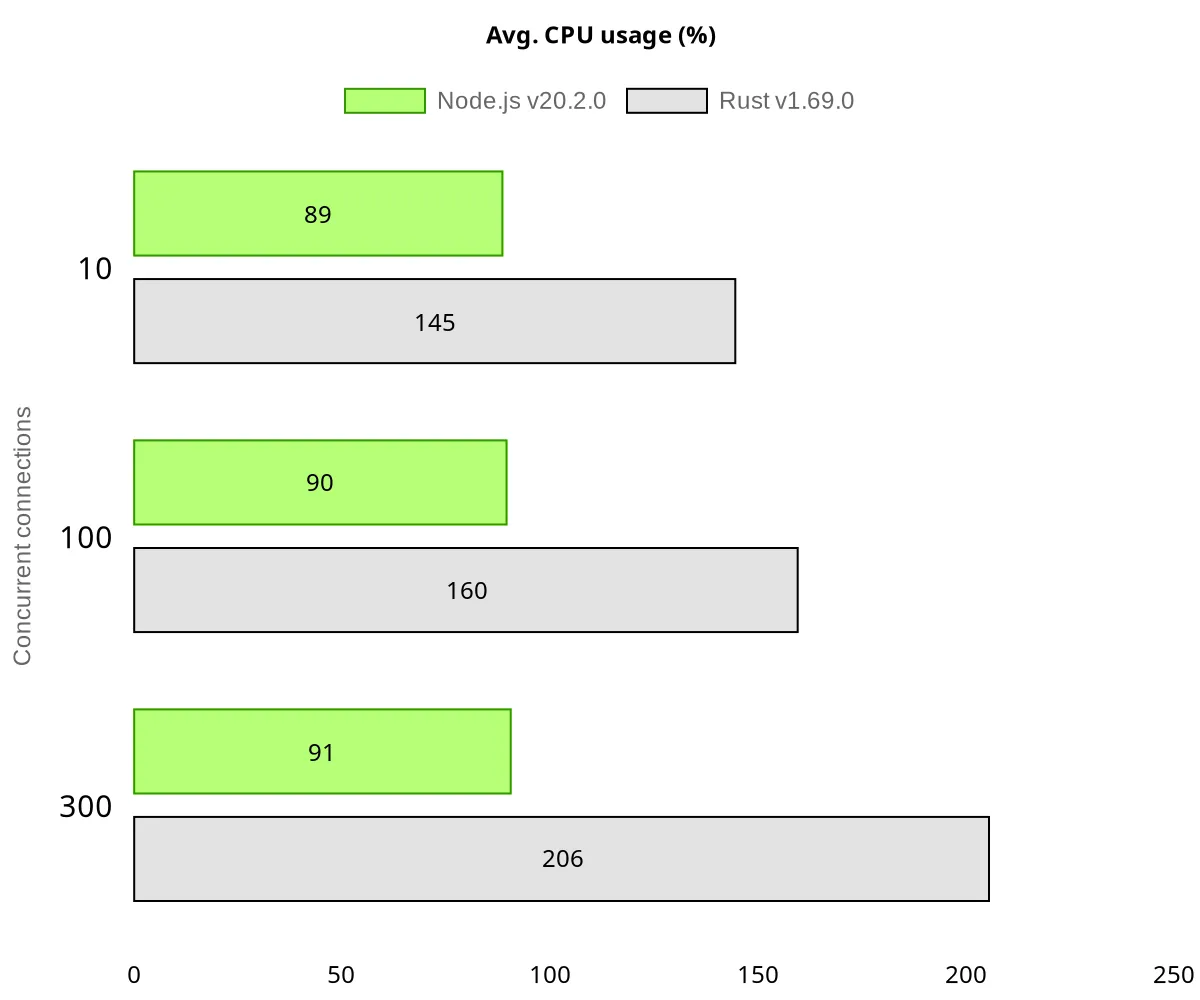
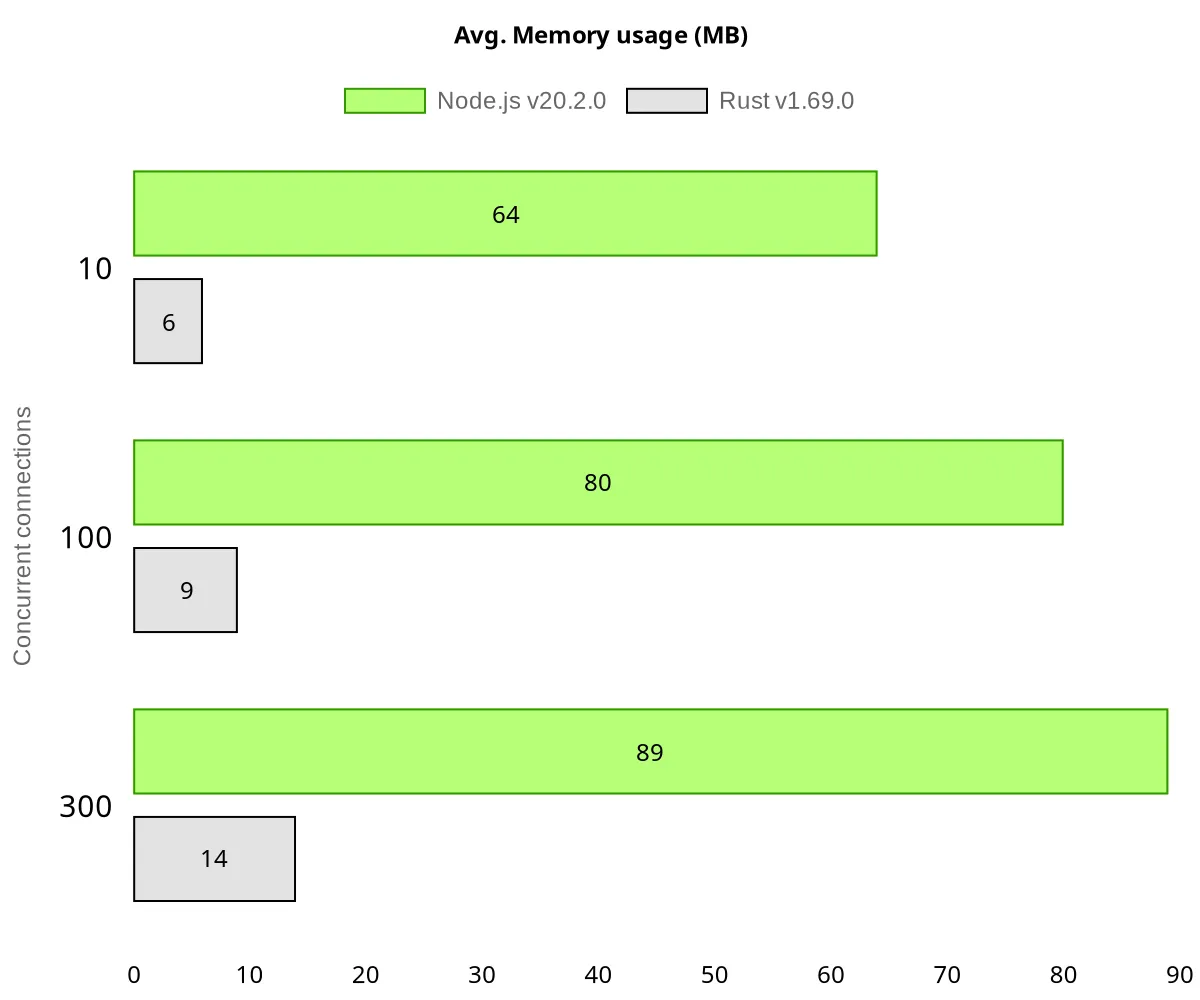
Rust's Low-Level Performance
 |
 |
|---|
Biome is written in Rust, a systems programming language. Rust is designed around zero-cost abstractions, meaning high-level abstractions can deliver the same performance as manually optimized low-level code. It also manages memory through an ownership system without a garbage collector (GC), avoiding the runtime overhead caused by GC.
ESLint and Prettier, by contrast, are written in JavaScript and run on the Node.js runtime. Although the V8 engine's JIT (Just-In-Time) compilation optimizes JavaScript, it cannot completely avoid the fundamental limitations of an interpreted language or the cost of garbage collection.
Single-Parse Architecture
Biome parses code only once with a single parser to create an AST (Abstract Syntax Tree). It reuses that AST for both formatting and linting.
What happens when you use ESLint + Prettier? ESLint parses the code, creates an AST, and performs linting; then Prettier parses the same code again, creates a separate AST, and performs formatting. The same file is parsed twice. Biome's single-parse architecture eliminates this duplication entirely.
Native Parallel Processing

Using Rust's concurrency model, Biome processes files in parallel across multiple threads. It divides work into small units and efficiently distributes the load across threads with a work-stealing scheduler. Because Rust's ownership system prevents data races at compile time, runtime synchronization costs are minimized as well.
Node.js uses a single-threaded, event-loop-based model by default. Worker Threads make parallel processing possible, but they add overhead from thread creation and message passing. Biome directly uses native OS-level threads, allowing it to make full use of CPU cores without that overhead.
Memory-Efficient AST Processing

Biome uses a CST (Concrete Syntax Tree). According to Biome's official architecture documentation, this CST implements the Green/Red Tree pattern based on an internal fork of the rowan library, preserving all information from the original code, including comments and whitespace. Rowan's arena-style memory allocation places nodes in contiguous memory regions, improving CPU cache locality and minimizing unnecessary object allocation.
With JavaScript's object-based approach to AST processing, each node exists as an independent heap object, scattering memory and increasing GC pressure. Biome's approach enables faster tree traversal while using less memory.
So, Should You Adopt Biome?
Biome's performance and convenience are clearly appealing. However, I do not think adopting it unconditionally is the right answer for every project. Let's consider a few practical factors.
When Biome Is a Good Fit
- When you maintain a large codebase where build and lint performance matter
- When you want to reduce code-checking time in a CI/CD pipeline
- When you are tired of the complexity of configuring ESLint + Prettier
- When you are starting a new project and want a concise tool configuration
My team was also maintaining a large-scale project where linting consumed a great deal of time in the CI pipeline, and developers were frustrated by slow linting speeds, so we decided to adopt Biome.
Points to Watch
The limited plugin ecosystem is the biggest concern. ESLint has thousands of community plugins, while Biome is centered on built-in rules. Many rules from major plugins—including eslint-plugin-react, eslint-plugin-react-hooks, eslint-plugin-jsx-a11y, eslint-plugin-unicorn, and typescript-eslint—are built in, but not every rule from each plugin has been ported. A GritQL-based plugin system has been announced for Biome v2, but it is still experimental. Projects that depend on framework-specific rules such as @next/eslint-plugin-next or eslint-plugin-angular need to approach migration carefully.
You should also verify the scope of language support. JavaScript, TypeScript, JSX, CSS, JSON, and GraphQL are supported reliably, but Vue and Svelte SFC (Single File Component) files have only partial support for their <script> blocks. HTML, YAML, and Markdown are not yet supported.
Do not forget that ESLint is evolving too. Flat Config (eslint.config.js), introduced in ESLint v9 in April 2024, significantly simplified the complexity of the previous .eslintrc approach. ESLint has also expanded linting beyond JavaScript with the releases of @eslint/json in October 2024 and @eslint/css in February 2025. The ESLint Stylistic (@stylistic/eslint-plugin) project provides an option to handle formatting with ESLint alone, without Prettier. In other words, Biome's all-in-one advantage is being somewhat diluted by the evolution of the ESLint ecosystem.
The history of the transition from Rome to Biome is also worth remembering. The disruption experienced by existing users when Rome was archived demonstrates how important a project's sustainability is when choosing a tool. Fortunately, Biome is funded through OpenCollective and GitHub Sponsors and continues to maintain a steady release cadence.

According to npm trends, Biome's weekly downloads—about 6.9 million—still lag far behind ESLint's roughly 120 million and Prettier's roughly 82 million. But Biome's growth rate is noteworthy. In just over a year, weekly downloads have increased more than three- to fourfold, with adoption in new projects rising particularly noticeably.
Closing Thoughts
My answer to whether Biome can completely replace ESLint and Prettier is "not yet, but it is a highly credible alternative."
Its performance is exceptional, its configuration is concise, and its development pace is fast. However, the immature plugin ecosystem and limitations in support for certain languages may become obstacles depending on the project. It is best to closely review your project's technology stack and your team's requirements before deciding whether to adopt it.
One thing is certain: the frontend tooling ecosystem is moving toward tools that are "faster, simpler, and more integrated." There is no denying that Biome is at the forefront of that movement. It is clearly a tool whose future growth is worth watching.